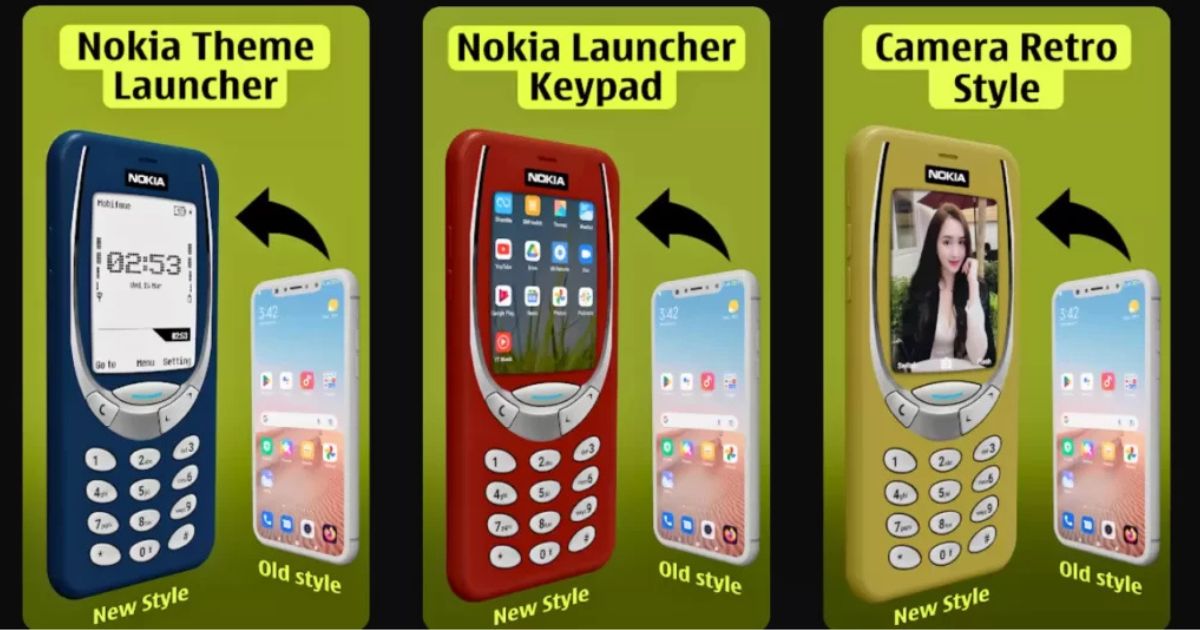
There is something uniquely nostalgic about the classic Nokia phone. Before smartphones became the centre of our daily lives, Nokia keypad phones were known for their simplicity, durability, and incredibly familiar interface. The physical buttons, straightforward menus, classic ringtone, and uncomplicated navigation created an experience that many people still remember fondly.
If you miss that old-school mobile experience but do not want to give up the features of a modern Android smartphone, a Nokia launcher app can offer an interesting middle ground. These launcher apps are designed to transform the appearance and feel of an Android device, giving it a classic Nokia-inspired keypad interface while keeping the underlying Android system and its modern capabilities.
What Is a Nokia Launcher App?
A Nokia launcher app is essentially a customization tool for Android. Instead of replacing your phone’s operating system, it changes the way the home screen, icons, menus, and navigation elements look and behave.
Depending on the launcher, you may get a retro interface inspired by classic Nokia keypad phones, complete with a traditional-looking home screen, simplified menus, familiar icons, and a virtual keypad-style layout.
The idea is simple: keep the power of Android while recreating the personality of a classic Nokia phone.
This makes such launchers particularly appealing to people who enjoy retro technology, minimalist interfaces, or simply want to give their smartphone a completely different appearance.
Why Are Nokia-Style Launchers Becoming Popular?
Modern smartphones are incredibly capable, but they can also feel complicated. There are countless applications, notifications, widgets, settings, and visual elements competing for attention.
Classic Nokia phones took the opposite approach. Everything was straightforward. You could open the menu, select an option, send a message, make a call, and return to the home screen without navigating through layers of modern smartphone interfaces.
A Nokia-inspired launcher brings some of that simplicity back.
For many users, it is not necessarily about replacing a smartphone with an old phone. Instead, it is about recreating the feeling of using one while continuing to enjoy Android’s apps, connectivity, camera, internet access, and other features.
Turn Your Android Into a Nokia-Inspired Phone
One of the most attractive features of a Nokia launcher is its ability to dramatically change your phone’s appearance.
After installing and configuring a suitable launcher, your Android home screen can take on a classic keypad-phone aesthetic. Depending on the app, you may be able to customise elements such as:
- Classic-style icons
- Retro menus
- Nokia-inspired wallpapers
- Virtual keypad interfaces
- Old-school navigation layouts
- Traditional-looking status information
- Simplified home screens
- Retro notification designs
The result can make a modern touchscreen smartphone feel surprisingly similar to the phones many people used years ago.
It is important to understand, however, that a launcher does not physically turn a touchscreen into a genuine Nokia keypad phone. Instead, it recreates the visual experience through software.
A Nostalgic Experience With Modern Android Features
The biggest advantage of this concept is that you do not have to sacrifice your Android features.
Your phone can continue running Android underneath the launcher. That means you can still use applications such as messaging platforms, social media, browsers, cameras, music players, and other Android apps.
This combination creates an interesting experience: the phone looks and feels retro on the surface, while its internal capabilities remain modern.
For someone who enjoys nostalgic technology but relies on smartphone applications every day, this can be the best of both worlds.
Simple Design Can Be Surprisingly Useful
Beyond nostalgia, there is also a practical reason to experiment with a minimalist launcher.
A traditional smartphone home screen can become crowded very quickly. Multiple pages of applications, colourful icons, widgets, and notifications can make it difficult to focus on what actually matters.
A Nokia-style interface generally encourages a more organised and simplified layout.
Instead of presenting dozens of applications immediately, you can create a cleaner environment where only your essential apps are easily accessible. This can make everyday navigation feel less overwhelming.
For users who prefer a distraction-free smartphone experience, a retro launcher can therefore be more than just a visual gimmick.
Customisation Options Matter
Not every Nokia launcher provides the same experience. Some focus primarily on appearance, while others attempt to recreate the complete navigation style of classic phones.
Before choosing one, it is worth checking its available customisation features.
A good launcher should ideally allow you to control the home-screen layout, icons, wallpaper, app shortcuts, and navigation behaviour. Some may also provide different retro themes, giving you the ability to switch between various classic styles.
Performance is another important consideration. A launcher should feel responsive and should not noticeably slow down your Android phone.
You should also pay attention to the permissions requested by the application. Since launchers can interact with parts of your phone’s interface, it is sensible to download them from reputable sources and review their permissions before installation.
Is a Nokia Launcher Worth Trying?
For people who genuinely miss classic Nokia phones, the answer can be yes.
A Nokia-inspired launcher is an easy way to experiment with a completely different smartphone experience without making permanent changes to the device. If you do not like the interface, you can normally switch back to your previous launcher.
It can also be a fun choice for people who grew up using keypad phones and want to revisit that experience. The familiar visual style can create an immediate sense of nostalgia, particularly when combined with classic wallpapers, sounds, and a retro-inspired layout.
At the same time, users should have realistic expectations. A launcher cannot reproduce every physical characteristic of an actual Nokia keypad phone. A touchscreen will remain a touchscreen, and the exact functionality will depend on the specific launcher.
Final Thoughts
The Nokia launcher concept is a fascinating example of how smartphone software can recreate the personality of older technology. Instead of throwing away the convenience of a modern Android device, users can simply change its interface and bring back some of the simplicity and nostalgia associated with classic Nokia phones.
Whether you want a retro look, a cleaner home screen, or simply want to remember what using a classic keypad phone felt like, a Nokia-style launcher can provide an enjoyable way to customise your Android device.
Modern smartphones may have become more powerful, but that does not mean the simplicity of the past has to disappear completely. With the right launcher, your Android phone can combine the nostalgic feel of a classic Nokia with the functionality of today’s smartphone technology—all from a single app.